Configuring CORS in ASP.NET Core
1. Prerequisites
If you are not familiar with the Same-Origin Policy (SOP) or the Cross-Origin Resource Sharing (CORS) policy, I recommend reading my previous post where I covered both in detail. This post assumes you have a general understanding of these policies and focuses on configuring CORS in an ASP.NET Core environment.
If you’re here to resolve an error, understand the problem and the involved policies first. The fix tends to fall out of that.
2. Configuring CORS
Configuring CORS in an ASP.NET Core project means adding CORS services to the service container, then enabling CORS through one of three paths: registering the CORS middleware in the pipeline, applying CORS attributes, or wiring it into endpoint routing.
2.1. Service Registration & Policy Configurations
The first step is to add CORS services to the project. You do this with AddCors(), which takes CORS settings as input and registers everything needed under the hood — the CORS service itself, a default policy provider and assorted options-related services.
Inside a single AddCors() call you can register as many policies as you want.
var builder = WebApplication.CreateBuilder(args);

// ...

builder.Services.AddCors(options =>
{
    options.AddPolicy(name: "AllowAll",
        configurePolicy: policy =>
        {
            policy.AllowAnyOrigin()
                .AllowAnyHeader()
                .AllowAnyMethod();
        });
    options.AddPolicy(name: "AllowOnlySomeOrigins",
        configurePolicy: policy =>
        {
            policy.WithOrigins("<https://example1.com>",
                "<https://example2.com>");
        });
});

// ...

var app = builder.Build();

// ...
Two policies registered here: AllowAll and AllowOnlySomeOrigins. AllowAll effectively turns CORS off, and AllowOnlySomeOrigins only accepts cross-origin requests from example1.com and example2.com.
The individual CORS settings are covered later in this post.
Next step: enable CORS using one of these policies. When using the middleware approach you’ll usually only need a single policy.
2.2. Middleware Registration
There are two options. Register the built-in CORS middleware with UseCors() to enable CORS across every endpoint, or use endpoint routing with RequireCors() to scope it to specific endpoints. Both are covered below.
The CORS middleware uses the services you added to the container to apply a CORS policy across all endpoints. You register it with UseCors(), which optionally takes a policy name.
For example;
// ...

var myPolicyName = "MyPolicyName"; // you will specify the exact same string in different places, so assigning policy names to variables avoids potential typo mistakes.
builder.Services.AddCors(options =>
{
  options.AddPolicy(name: myPolicyName,
    configurePolicy: policy =>
    {
        policy.WithOrigins("<http://example1.com>",
	        "<http://example2.com>");
    });
});

// ...

var app = builder.Build();

app.UseHttpsRedirection();
app.UseStaticFiles();
app.UseRouting();

**app.UseCors(**myPolicyName**);**

app.UseAuthorization();

app.UseEndpoints(endpoints =>
{
	// ...
2.2.1. Using Default Policy
If you register a policy with AddDefaultPolicy(), you can call UseCors() or RequireCors() without passing a policy name. The same goes for the [EnableCors] attribute. When a default policy is set, the CORS middleware and services know which policy to fall back to.
Worth noting: even if you have only one policy registered, calling UseCors() without a policy name will not enable CORS. You have to call AddDefaultPolicy() for at least one policy if you don’t want to pass a name to UseCors(), RequireCors(), or [EnableCors].
Registering a default policy is identical to registering any other policy, except you call AddDefaultPolicy() instead of AddPolicy().
builder.Services.AddCors(options =>
{
	options.AddDefaultPolicy(
	  policy =>
	  {
	      policy.WithOrigins("<http://example.com>");
	  });
});
2.2.2. Regarding Middleware Order
Middleware order matters. Be careful where the CORS middleware lands in the pipeline — for example, you wouldn’t want UseResponseCaching() (if you’re using response caching) to sit before the CORS middleware.
2.2.2.1. Important Note for JavaScript Clients
Typically, UseStaticFiles() is called before the UseCors(). However, when using JavaScript clients (e.g., Angular, React), you must call UseCors() before UseStaticFiles().
2.3. Enabling CORS With Attributes
The middleware approach applies one CORS policy across every endpoint. If you need finer control over which endpoints have CORS enabled, and with which policy, use the [EnableCors] attribute.
This kind of control is rarely needed. Most projects won’t reach for it.
You can apply [EnableCors] to razor page PageModels, controllers, or controller action methods. Bare [EnableCors] picks up the default policy; [EnableCors("{PolicyName}")] targets a named one.
💡 When the
[EnableCors]attribute is applied to an endpoint AND the CORS middleware is registered in pipeline, both policies get applied. Don’t do this — pick one approach.
Here is how you can enable CORS with a specific policy on a controller action:
public classController : Controller
{

	// ...

	  [EnableCors("PolicyName")]
	  public ActionResult<string> FunCatFact()
	  {
	      return "A group of cats is called a clowder.";
	  }

  // ...

}
2.3.1. [DisableCors] Attribute
The [DisableCors] attribute turns CORS off on specific endpoints when the CORS middleware (UseCors()) is in play, or on specific controller actions when [EnableCors] sits on the controller. Example:
[EnableCors] // if there is a default policy set, you don't have to specify policy name
public class CatController : Controller
{

	// ...

		[DisableCors] // this will disable CORS for this action
	  public ActionResult<string> FunCatFact()
	  {
	      return "A group of cats is called a clowder";
	  }

	  // this action will have CORS enabled, since it was enabled on the controller
	  public ActionResult<string> FunDogFact()
	  {
	      return "Dogs dream just like humans do (apparently)";
	  }

  // ...

}
3. CORS Settings Explained In-Detail
3.1. Allowing Origins
- AllowAnyOrigin: Allows cross-origin requests from all origins, accepting any scheme (accepting both http and https). Using this setting is highly discouraged. Effect;
Access-Control-Allow-Origin: *header gets added to CORS responses. Usage;policy.AllowAnyOrigin() - WithOrigins: Specifies a list of origins that are allowed to initiate cross-domain requests. Effect;
Access-Control-Allow-Originheader gets added to CORS responses. Usage;policy.WithOrigins("<http://example1.com>", "<http://example2.com>")
3.2. Allowing Methods
- AllowAnyMethod: Allows any HTTP method. Effect;
Access-Control-Allow-Methods: *header gets added to CORS responses. Usage;policy.AllowAnyMethod() - WithMethods: Specifies a list of methods to be allowed in cross-origin requests. Effect;
Access-Control-Allow-Methodsheader gets added to CORS responses. Usage;policy.WithMethods("GET", "POST")
3.3. Allowing Headers
- AllowAllHeaders: Simply allows all headers in cross-origin requests. Effect;
Access-Control-Allow-Headers: *header gets added to CORS responses. Usage;policy.AllowAnyHeader() - WithHeaders: Specifies a list of headers that are accepted in cross-origin requests. Effect;
Access-Control-Allow-Headersheader gets added to the CORS responses. Usage;policy.WithHeaders(HeaderNames.AcceptCharset, "X-MyCustomHeader", "X-MyOtherCustomHeader")
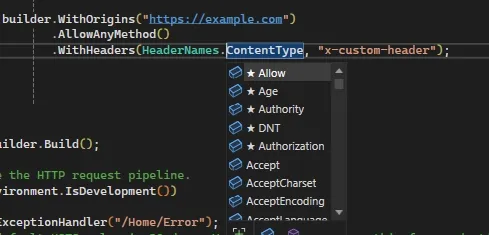
You can use “HeaderNames” to specify known HTTP headers.
- WithExposedHeaders: Specifies a list of headers that can be exposed/shown to the calling script. By default, browsers will filter out all non-CORS-safelisted headers from the responses. Effect; Access-Control-Expose-Headers header gets added to CORS responses. Usage; policy.WithExposedHeaders(“X-MyCustomHeader”, “X-MyOtherCustomHeader”)
3.4. Allowing/Disallowing Credentialed Requests
- AllowCredentials: Specifies whether credentialed requests are allowed. Effect; Access-Control-Allow-Credentials: true header gets added to CORS responses. Usage; policy.AllowCredentials()
- DisallowCredentials: Sets the policy to not accept credentialed requests. Effect; Access-Control-Allow-Credentials: false header gets added to CORS responses. Usage; policy.DisallowCredentials()
3.5. Setting Preflight Cache Duration
-
SetPreflightMaxAge: Specifies the duration for which the preflight response can be cached. Effect; Access-Control-Max-Age header gets added to CORS responses, where 55 is an example amount. Usage; policy.SetPreflightMaxAge(TimeSpan.FromSeconds(55))
If you called AllowCredentials, you can’t also call AllowAnyOrigin, AllowAnyMethod, or AllowAllHeaders on the same policy because CORS spec prohibits any wildcards in credentialed requests.
4. Offloading CORS to IIS
Just as you can hand off tasks like HSTS and HTTPS redirection to IIS, you can hand off CORS policy management to the web server.
When CORS lives on IIS, you can change CORS settings without versioning the app. (You get the same flexibility in-app by reading CORS settings from appsettings.json.)
If the server doesn’t allow anonymous access, Windows Authentication has to run before CORS — and the IIS CORS module makes that ordering possible.
The catch: you won’t be able to run your project locally that way. So even if you offload CORS to IIS in production, you’ll still need to register CORS services and middleware conditionally in code, gated on the current environment.
You can install the IIS CORS module from https://www.iis.net/downloads/microsoft/iis-cors-module.