EBookArchive
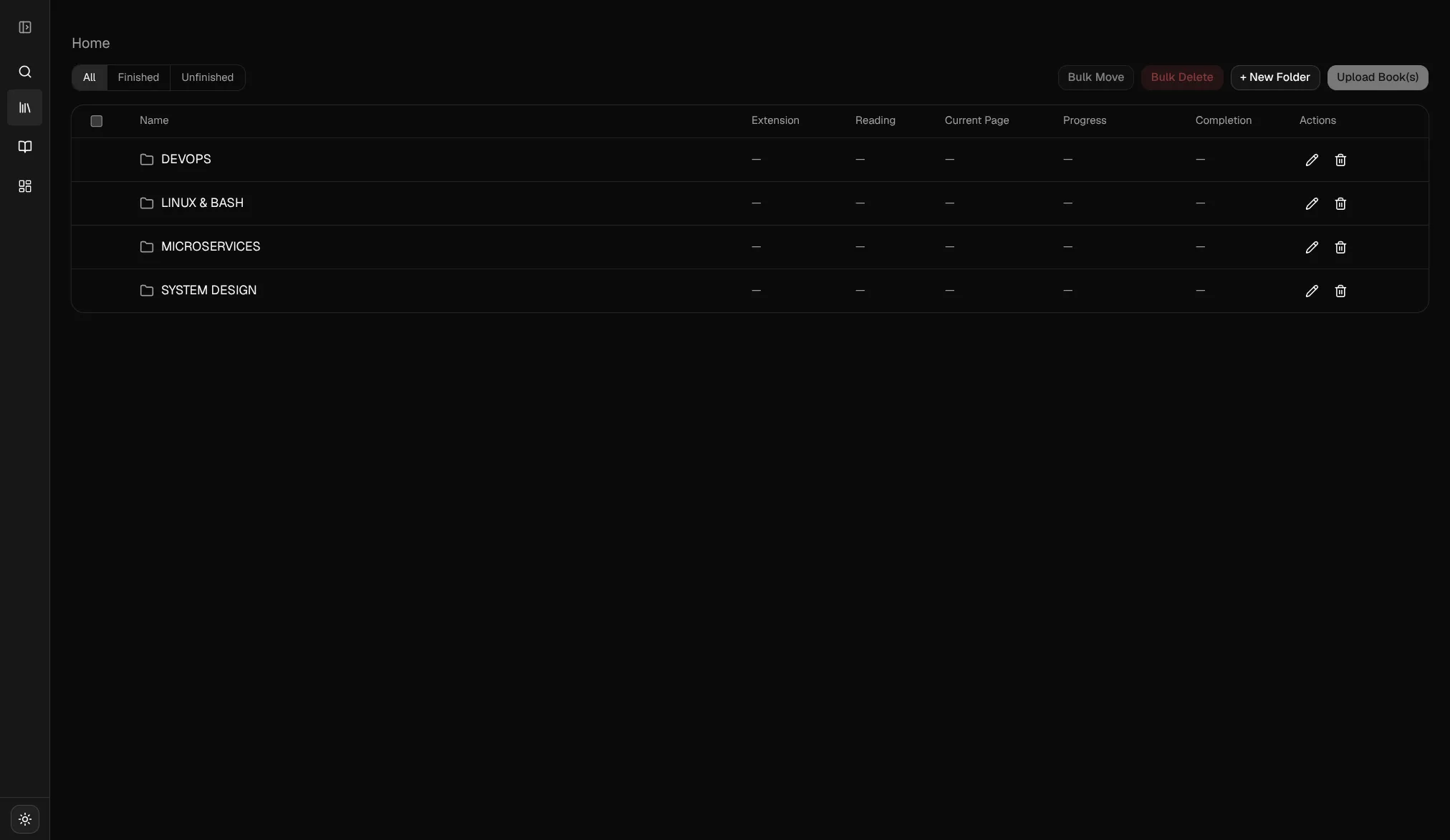
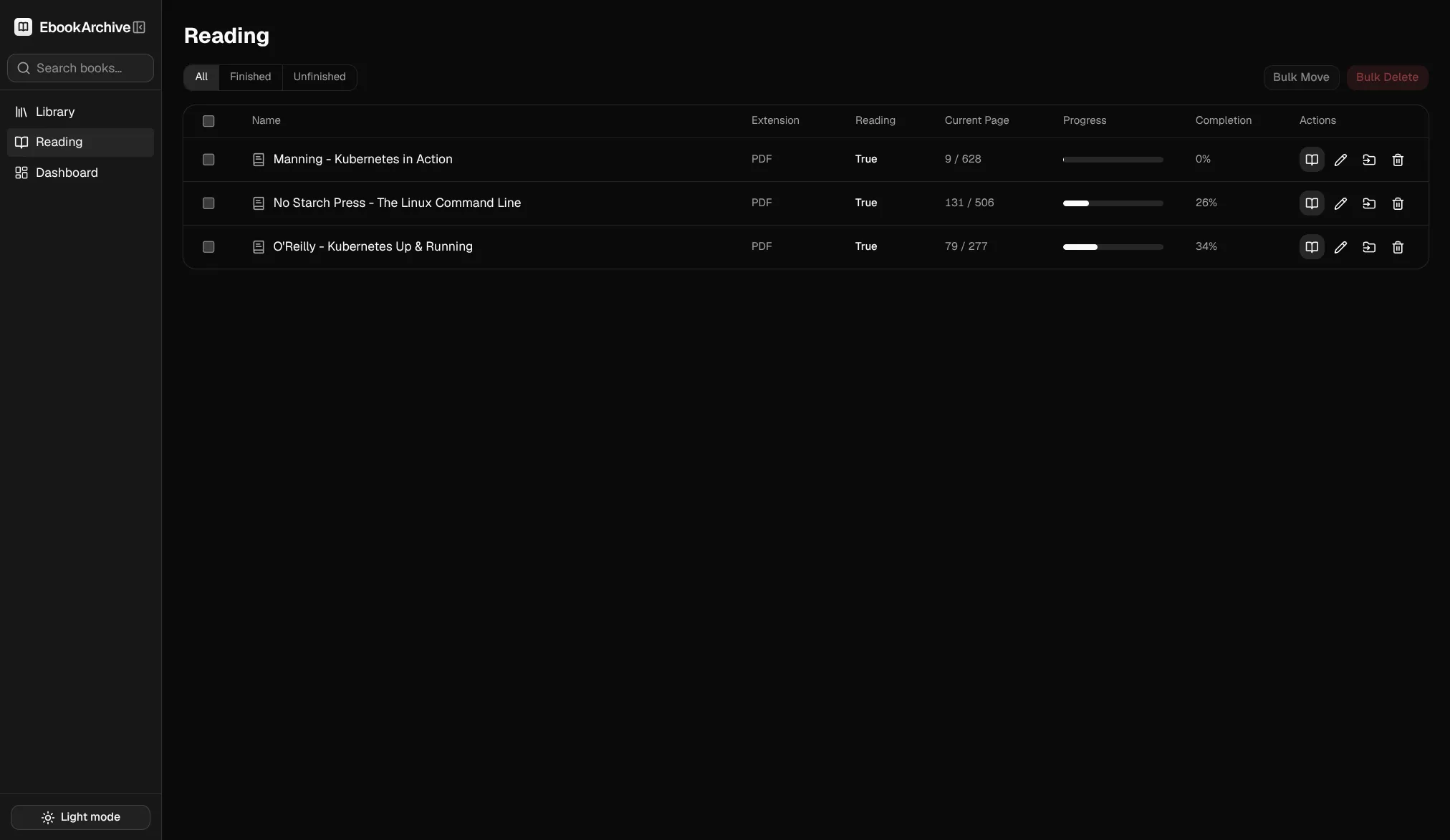
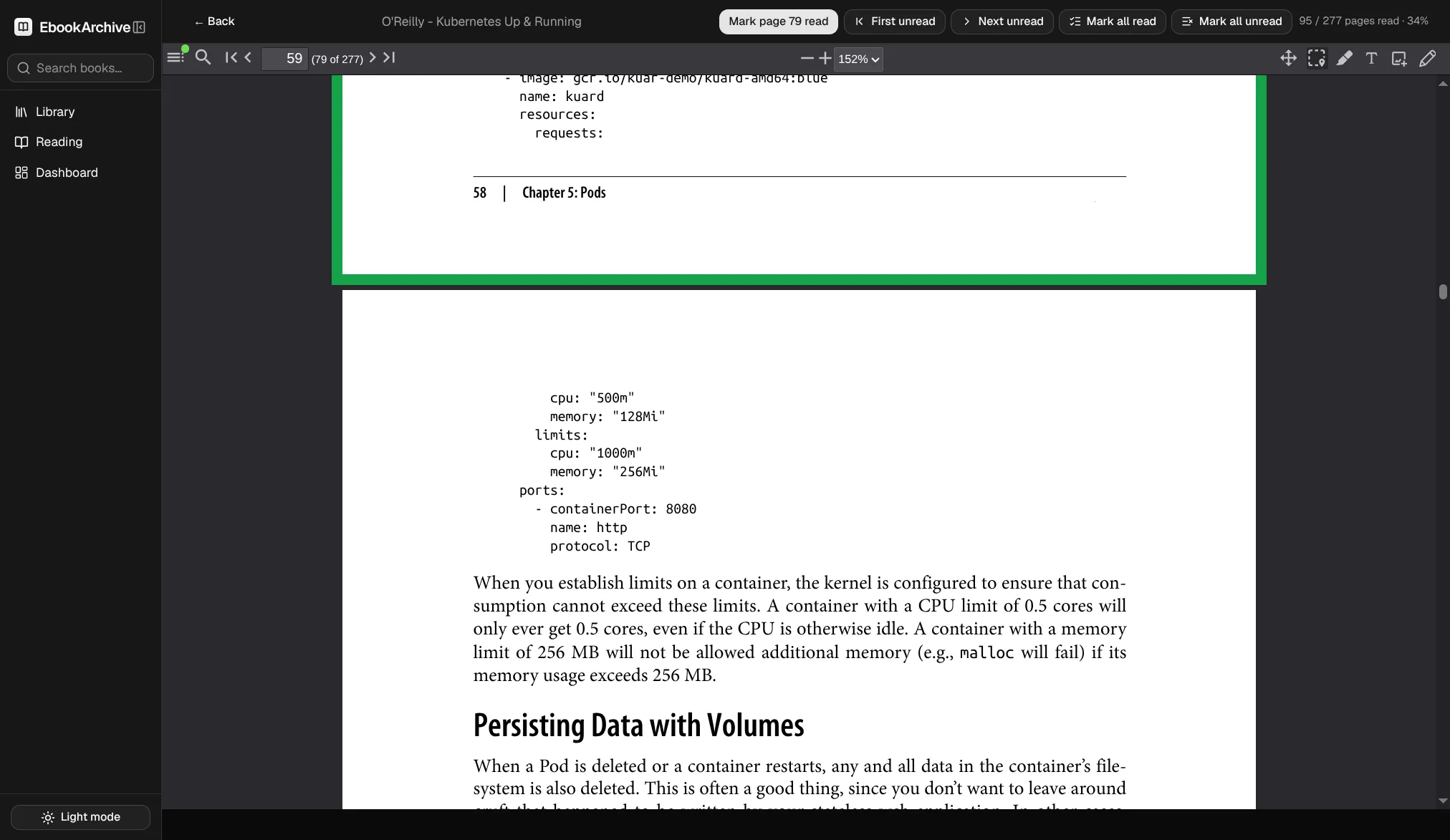
A self-hosted web app for reading PDFs and keeping track of what you’ve read. A NestJS backend holds the metadata in SQLite and the files in MinIO; an Angular frontend renders the reader and a statistics dashboard. The part that makes it more than a folder full of PDFs is that it remembers: every page you finish is recorded, so each book carries its own progress and the dashboard charts how many pages you read per day.
I built it because my technical reading lives in PDFs scattered across a laptop, a tablet, and a cloud drive, and none of those knew where I’d stopped or how much I’d actually gotten through. The interesting engineering isn’t the CRUD around books and folders. It’s three decisions underneath: how the PDF bytes reach the browser without exposing the object store, how “this page is read” is stored so the toggle can’t corrupt itself, and how a deployment built entirely around a single-writer database stays honest about that constraint instead of pretending to scale. Those are the three sections that follow, plus the folder model that ties the reading stats together.
1. A self-hosted PDF reader with per-page tracking
The data model is four SQLite tables: folders, books, page_reads, and reading_statistics. Folders nest into a tree, each book belongs to exactly one folder, and reading state hangs off the book. Metadata is small and relational, so SQLite via Drizzle is the whole database story. There’s no separate DB server to run, which for a personal archive is a feature, not a limitation, and section 5 is largely about taking that constraint seriously.
The files are a different shape of problem. A library of PDFs is gigabytes of opaque blobs that never change once uploaded, which is exactly what object storage is for. So the bytes live in MinIO (an S3-compatible store) and only the pointer, a minio_key, lives in SQLite. That split, small mutable metadata in SQLite and large immutable blobs in MinIO, is the spine everything else hangs off. The reader talks to the backend; the backend talks to MinIO; the browser never learns MinIO exists. Getting that last part right is section 2.
2. Streaming PDFs without exposing the object store
The browser fetches every PDF through one backend endpoint, GET /api/books/:id/file, and never touches MinIO directly. The obvious alternative was to hand the browser a presigned S3 URL and let it pull bytes straight from the object store. That would mean configuring CORS on MinIO, exposing its endpoint to the network, and giving up the chance to enforce anything at request time. Instead the backend sits in front as a streaming proxy, which keeps the MinIO credentials server-side and gives a single place to check that the book exists before a single byte moves.
The catch is that a PDF viewer doesn’t want the whole file. ngx-extended-pdf-viewer runs pdf.js under the hood, and pdf.js fetches a document in pieces using HTTP range requests, so it can render page one of a 400-page book without downloading the other 399. A proxy that buffered each file and returned it whole would break that entirely. So the endpoint forwards the range instead of parsing it:
@Get(':id/file')
async getFile(
  @Param('id') id: string,
  @Headers('range') range: string | undefined,
  @Res() res: Response,
): Promise<void> {
  const book = (await this.booksService.getById(id)) as { minio_key: string };
  const obj = await this.storageService.getObject(book.minio_key, range);
  res.status(obj.statusCode);
  res.setHeader('Content-Type', obj.contentType ?? 'application/pdf');
  res.setHeader('Accept-Ranges', 'bytes');
  if (obj.contentLength != null) res.setHeader('Content-Length', String(obj.contentLength));
  if (obj.contentRange) res.setHeader('Content-Range', obj.contentRange);
  obj.body.on('error', (err) => res.destroy(err));
  obj.body.pipe(res);
}
The controller never parses bytes=start-end itself. It passes the raw Range header straight into the S3 GetObjectCommand, and MinIO does the range math and returns the right slice with its own Content-Range:
const res = await this.client.send(
  new GetObjectCommand({ Bucket: this.bucket, Key: this.keyPrefix + key, Range: range }),
);
return {
  body: res.Body as Readable,
  contentType: res.ContentType,
  contentLength: res.ContentLength,
  contentRange: res.ContentRange,
  statusCode: res.ContentRange ? 206 : 200,
};
Two details matter here. First, the 206 Partial Content status is derived purely from whether S3 handed back a Content-Range, so the partial-response semantics originate at MinIO and the backend just relays them faithfully. Reimplementing byte-range parsing in the app would have been code to get subtly wrong for no benefit. Second, the body is piped, never buffered, so memory stays flat whether the PDF is 2MB or 200MB. Piping a stream has one sharp edge: if MinIO drops the connection mid-transfer, the Readable emits an error event, and in Node an unhandled stream error takes down the process. The obj.body.on('error', (err) => res.destroy(err)) line is load-bearing. It tears down the response so the client sees a broken connection instead of the server crashing.
3. Read state as set membership
Whether page 47 of a book is read is stored not as a boolean but as the presence or absence of a row. page_reads has no read column; a row exists if and only if the page is read, and the composite primary key (book_id, page_number) makes that a set:
export const pageReads = sqliteTable('page_reads', {
  bookId: text('book_id').notNull().references(() => books.id),
  pageNumber: integer('page_number').notNull(),
  readAt: text('read_at').notNull(),
}, (table) => ({
  pk: primaryKey({ columns: [table.bookId, table.pageNumber] }),
}));
Modeling it this way means the toggle is idempotent at the schema level. Marking a page checks for the row and inserts it; unmarking deletes it. Even if two requests raced, the primary key forbids a duplicate, so the worst case is a constraint error rather than a page that’s somehow “read twice.” A boolean column would have needed its own not-null default, update-in-place logic, and a migration story for pages that had never been touched. Row-existence sidesteps all of it.
The complication is the dashboard, which wants pages-read-per-day. Deriving that on the fly from page_reads would mean grouping by date(read_at) on every dashboard load, and it would fall apart the moment a page is un-read, because the row that carried the date is gone. So there’s a second table, reading_statistics, a denormalized daily rollup keyed by (date, book_id), and both writes happen in one transaction:
this.db.transaction((tx) => {
  tx.insert(pageReads).values({ bookId, pageNumber, readAt: new Date().toISOString() }).run();
  const existingStat = tx.select().from(readingStatistics)
    .where(and(eq(readingStatistics.date, today), eq(readingStatistics.bookId, bookId)))
    .all()[0];
  if (existingStat) {
    tx.update(readingStatistics).set({ pagesRead: existingStat.pagesRead + 1 })
      .where(/* date + bookId */).run();
  } else {
    tx.insert(readingStatistics).values({ date: today, bookId, pagesRead: 1 }).run();
  }
});
Wrapping the page row and the counter in a single synchronous transaction is what keeps them from drifting: either both change or neither does. It also makes the manual read-modify-write upsert (select, then update-or-insert) safe, because nothing else can interleave inside the transaction.
The decision I’m happiest with in this area is where the two tables are deliberately allowed to disagree. “Mark all pages read,” the button you hit when you’ve finished a book you were tracking loosely, rewrites page_reads but leaves reading_statistics untouched:
this.db.transaction((tx) => {
  tx.delete(pageReads).where(eq(pageReads.bookId, bookId)).run();
  if (read && book.totalPages > 0) {
    const values = Array.from({ length: book.totalPages }, (_, i) => ({
      bookId, pageNumber: i + 1, readAt: now,
    }));
    tx.insert(pageReads).values(values).run();
  }
});
Bulk-marking 400 pages is a status correction, not an afternoon of reading, and crediting it to today would spike the daily chart with a day you didn’t actually read 400 pages. So page_reads (current completion state) and the sum of reading_statistics (reading activity over time) are two different questions with two different answers, and the code treats them that way on purpose. That’s the kind of distinction that looks like an inconsistency until you notice it’s the point.
4. Rolling nested folders up with a recursive CTE
Folders form a tree, stored as an adjacency list: each row carries a nullable parent_folder_id pointing at its parent, and roots have null. Adjacency list keeps writes trivial, a new folder is one insert and a rename is one update, with no path strings to rewrite when anything moves. The cost is paid at read time, when you need a folder’s full ancestry. For a personal library of dozens of folders, that cost is loading the whole table into a Map once per request and walking parents in memory, which is cheap enough that a materialized-path column would be premature.
Depth is capped at five levels, enforced by measuring a folder’s full ancestor path rather than peeking one level up. The same path-walk doubles as a cycle guard:
while (current) {
  if (seen.has(current.id)) {
    throw new BadRequestException('Folder hierarchy contains a cycle');
  }
  seen.add(current.id);
  path.unshift({ id: current.id, name: current.name });
  current = current.parentFolderId ? byId.get(current.parentFolderId) : undefined;
}
That guard is defensive rather than load-bearing, and that’s a deliberate design choice. Folders can’t be re-parented through the API at all: update only changes a folder’s name, there’s no move-folder endpoint, and only leaf books move between folders. A book is always a leaf, so a book move can never form a cycle. Whole classes of bug, orphaned subtrees, re-parenting into your own descendant, are designed out rather than handled. Deletion follows the same instinct: a folder that still contains subfolders or books refuses to delete with a 409 instead of silently cascading, so you can’t lose a shelf of books to one misclick.
The one place the tree genuinely needs SQL is the reading dashboard, which rolls activity up to the top-level folder so “how much did I read in “Distributed Systems” this month” counts every book in every subfolder beneath it. Walking that in application code would mean pulling every stat row and re-deriving ancestry per row; SQLite does it in one recursive CTE:
WITH RECURSIVE folder_roots AS (
  SELECT id, name, parent_folder_id, id AS root_id, name AS root_name
  FROM folders WHERE parent_folder_id IS NULL
  UNION ALL
  SELECT f.id, f.name, f.parent_folder_id, fr.root_id, fr.root_name
  FROM folders f JOIN folder_roots fr ON f.parent_folder_id = fr.id
)
SELECT rs.date, fr.root_id AS folder_id, fr.root_name AS folder_name,
       SUM(rs.pages_read) AS pages_read
FROM reading_statistics rs
JOIN books b ON rs.book_id = b.id
JOIN folder_roots fr ON b.folder_id = fr.id
WHERE rs.date >= ${from} AND rs.date <= ${to}
GROUP BY rs.date, fr.root_id
ORDER BY rs.date ASC;
The CTE tags every folder with the root it descends from, the join attributes each book’s daily counts to that root, and the result comes back as one time series per top-level folder, already shaped for the chart. This is the split I keep coming back to across the project: walk the tree in TypeScript when the job is per-request and small, drop to a recursive CTE when the job is an aggregate the database should own.
5. Deployment: same-origin, non-root, single-writer SQLite
Everything about the deployment is shaped by one fact: SQLite is a single-writer database. Rather than paper over that, the whole topology commits to it. The backend runs at exactly one replica with a Recreate rollout strategy, so the old pod fully releases the write-ahead-log file before the new one opens it, and the database lives on a ReadWriteOnce volume with an explicit warning against networked storage:
accessModes:
  - ReadWriteOnce   # SQLite needs exclusive access — never ReadWriteMany / NFS
# Use a local-path or block StorageClass (e.g. local-path, gp3, pd-balanced).
# DO NOT use NFS — network locking breaks SQLite WAL mode and corrupts the DB.
That’s the trade stated plainly: no horizontal scaling of the backend, in exchange for zero database-server operations. For a self-hosted archive with one reader, that’s the right side of the trade, and pretending otherwise would mean running Postgres to serve a library that fits in a single file.
The three services (MinIO, backend, frontend) run in both Docker Compose and Kubernetes off the same images, and the frontend nginx is what makes that portable. It serves the Angular SPA and reverse-proxies /api to the backend under the same origin, so there’s no CORS and no second API host to configure. Buffering is turned off on that location specifically so the range-streaming from section 2 passes straight through instead of being spooled in nginx:
location /api/ {
    proxy_pass http://backend:3700;
    proxy_http_version 1.1;
    proxy_set_header Host $host;
    proxy_buffering off;
    proxy_request_buffering off;
    client_max_body_size 200m;
}
Because the backend service is named backend in both Compose and Kubernetes, that one config works in local dev and in-cluster with no rebuild. The client_max_body_size 200m is there because uploads flow through the same proxy, and a 200-page PDF is not small.
The security posture is non-root by default. The backend image reuses the node:22-slim built-in user (UID 1000) and pre-creates a writable /data for the SQLite file; the Kubernetes pod matches it with runAsNonRoot, runAsUser: 1000, and fsGroup: 1000 so the mounted volume is writable without a root container. MinIO’s S3 API port is never published, only its admin console is, so the object store is reachable only from inside the pod network. Nothing about that is exotic. It’s the difference between a stack I’d expose to my own network without thinking twice and one I’d have to remember the caveats of.
What I’d revisit if this grew past one reader is the single-writer ceiling, which is a real wall rather than a soft limit, and moving auth from “trusted network” into the app. Both are deliberately out of scope for what this is: a reader for my own shelf that happens to be built like something I’d hand to someone else.